Stop Tinkering, Start Building: Your First AI Workflow Is Easier Than You Think
Forget those endless articles telling you how possible AI workflows are. Let’s cut the crap. You want to build your own AI workflow, right? You’re tired of just reading about how cool AI agents are and ready to get your hands dirty. Good. Because it’s not some black magic only Silicon Valley wizards can perform. Honestly, most of it is just coecting a few smart tools together. Think of it like LEGOs, but instead of plastic bricks, you’ve got AI models and automation triggers. We’re talking about making your computer do the boring stuff for you, or even generating creative content on demand. Sounds good? Let’s dive in.
Source : youtube.com
Why Bother Building Your Own AI Workflow?
Look, there are tons of pre-built AI tools out there. Sure, they’re convenient. But they’re also limited. They do what they want you to do. Building your own workflow? That’s where the real power lies. It means you get to tailor the AI to your exact needs. Need an AI that summarizes client calls and drafts follow-up emails automatically? You can build that. Want a tool that generates social media captions based on your latest blog post? Done. It’s about customizing AI for you, not the other way around. Plus, it’s way cheaper than hiring a developer to build a bespoke solution. You’re basically becoming your own tech wizard, one automation at a time.
The Core Components: What You Actually Need
So, what’s under the hood of these magical workflows? Don’t overthink it. At its heart, an AI workflow usually needs three things:
- A Trigger: This is what kicks everything off. It could be anything – a new email, a message in Slack, a specific time of day, or even a button you click.
- The AI Brain: This is where the actual AI magic happens. You’ll typically use a language model (like GPT-4 or similar) to process information, generate text, analyze data, or whatever else you need.
- An Action: Once the AI has done its thing, what happens next? This is the action. It could be sending an email, updating a spreadsheet, posting to social media, or saving a file.
Think of it like this: Your alarm clock (trigger) goes off, you (AI brain) decide it’s time to get up and make coffee, and then you actually make the coffee (action). Simple, right?
Choosing Your Weapon: No-Code vs. Code
Source : druidai.com
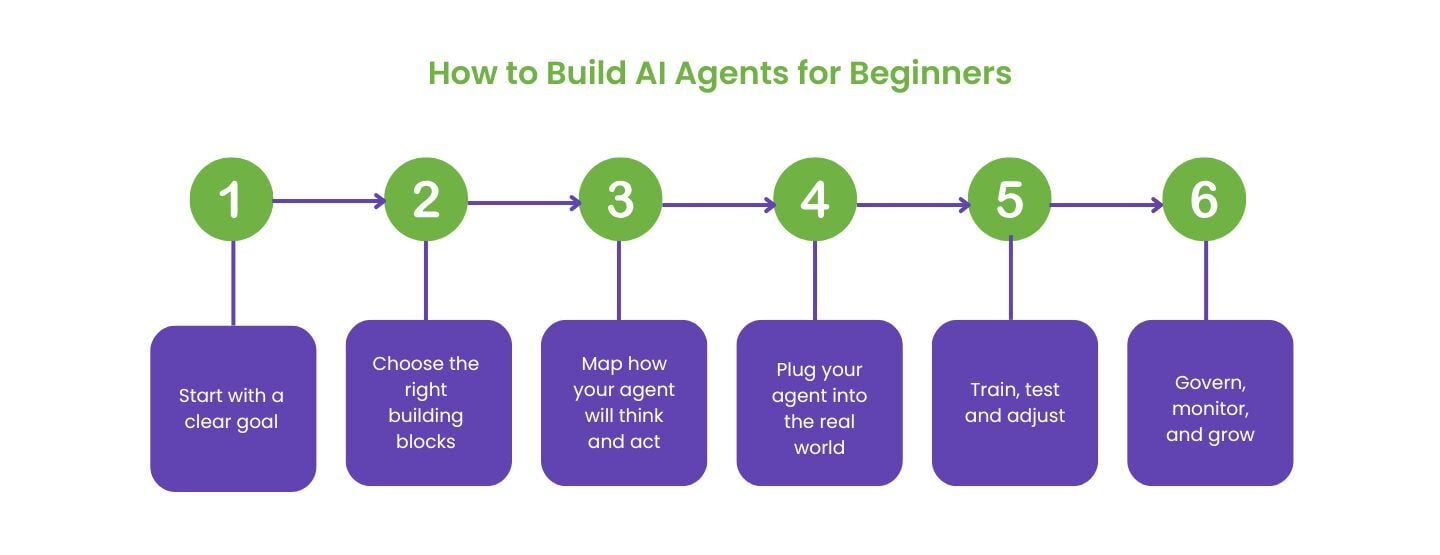
Now, here’s a crucial fork in the road. You can go the no-code route or the coding route.
The No-Code Path: Drag, Drop, Done.
This is where most begiers start, and honestly, it’s where I still do a ton of my work. Tools like n8n, Make (formerly Integromat), or Zapier let you build workflows by dragging and dropping nodes (those triggers, AI brains, and actions) onto a canvas and coecting them. It’s incredibly visual and surprisingly powerful. You don’t need to know how to code at all. You plug in your API keys, set up your prompts, and let the tool handle the backend. It’s fast, it’s intuitive, and it’s perfect for getting results quickly. I’ve seen people build complex customer support automations in an afternoon using these tools. You can even get started with a free tier on many of them.
The Coding Path: Ultimate Control.
If you do know how to code (or want to learn), you have even more flexibility. Frameworks like LangChain or LlamaIndex allow you to build highly customized AI applications. This is where you can really push the boundaries, build complex agent interactions, and manage long-term memory for your AI. It requires more technical know-how, obviously. You’ll be dealing with Python, APIs, and potentially cloud infrastructure. But if you’re aiming for something super specific or want deep control over every aspect, this is the way to go. For a begier, though? Stick with no-code first. Get the concepts down.
Getting Started: Your First Workflow Walkthrough (n8n Example)
Okay, theory’s great, but let’s build something real. We’ll use n8n.io because it’s powerful, open-source, and has a generous free tier. It’s a fantastic place to learn the ropes of building AI workflows without breaking the bank. You can follow their official guide here: n8n AI Tutorial. But let’s break down the basic steps you’ll take.
Step 1: Set Up Your Workspace
First, you need to get n8n ruing. You can use their cloud version or install it locally on your computer. For begiers, the cloud version is easiest. Just sign up, and you’re in. You’ll see a dashboard where you manage your workflows.
Step 2: Create a New Workflow
Click the ‘New Workflow’ button. You’re now looking at a blank canvas. This is your playground. Think of it as a digital whiteboard where you’ll map out your automation.
Step 3: Add a Trigger Node
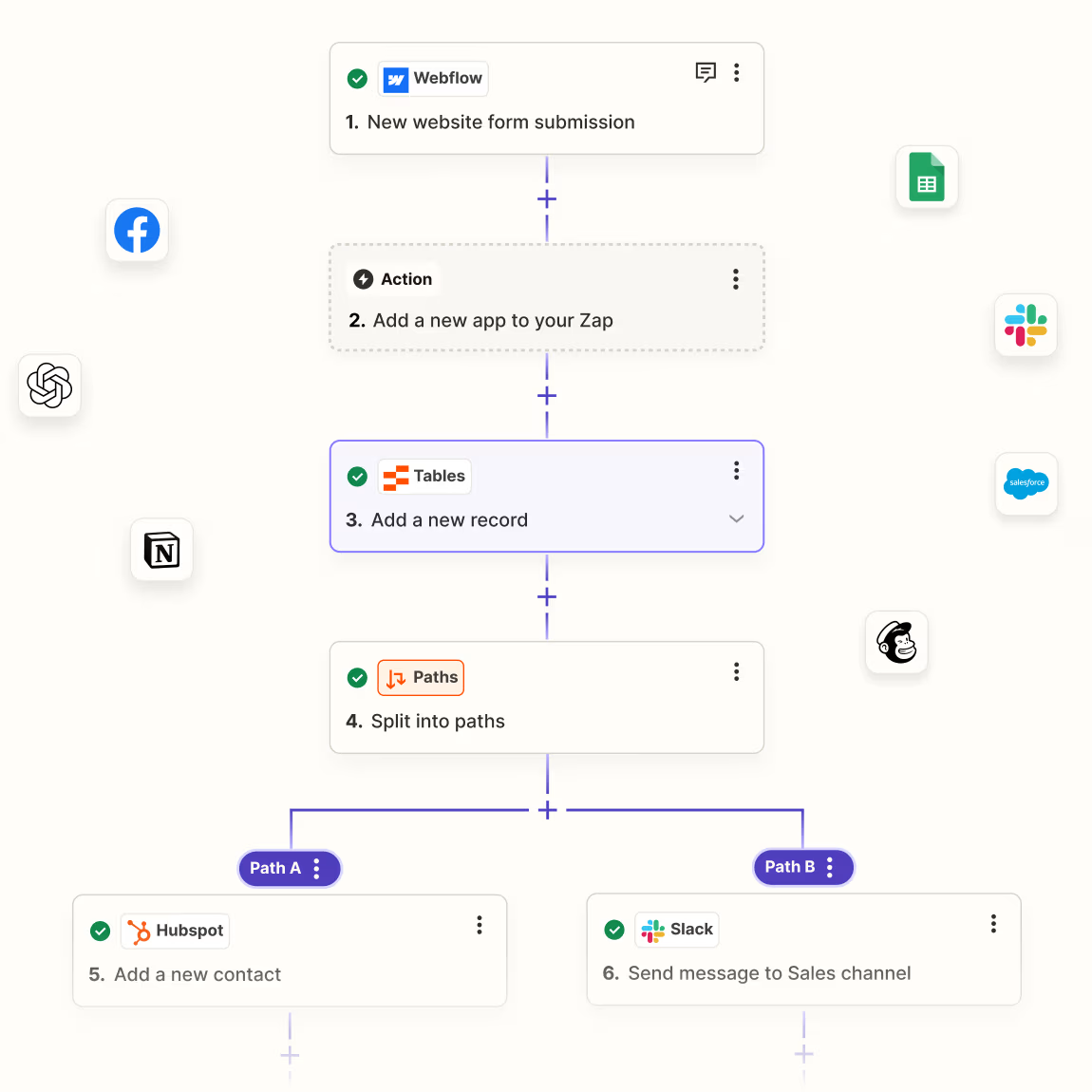
Every workflow needs a starting point. Let’s say we want to trigger this workflow when we receive a specific type of email. You’d search for an ‘Email Trigger’ node (or something similar, depending on the platform) and drag it onto the canvas. You’ll then configure it – coect your email account, specify keywords, etc.

Source : chatprd.ai
Step 4: Add Your AI Node
This is the fun part! Search for an AI node. n8n has nodes for OpenAI, Anthropic, and others. Drag one onto the canvas. This node will be the ‘brain’ of our operation. For example, we might use the OpenAI node.
Step 5: Configure the AI Node (The Prompt!)
This is CRITICAL. Here, you’ll tell the AI what to do. This is your prompt engineering playground. Let’s say we want the AI to summarize the content of the email. Your prompt might look something like this:
"Summarize the following email content in 3 bullet points. Focus on key actions and decisions. Email: {{ $json.body }}"
The `{{ $json.body }}` part is how n8n knows to grab the actual email content from the previous node. You’re feeding data into the AI. You can get really creative here, asking it to extract information, draft responses, categorize text, and more.
Step 6: Add an Action Node
What do you want to happen with that ? Maybe you want to send it to a Slack chael. So, you’d add a ‘Slack’ node. Configure it to post the you just generated. You’ll coect your Slack account and specify the chael.
Step 7: Coect the Nodes
Now, draw lines between the nodes to show the flow of data. Trigger -> AI Node -> Slack Node. Simple, visual, and logical.
Step 8: Test and Refine
Hit the ‘Execute Workflow’ or ‘Save & Execute’ button. n8n will run the workflow once. Check your Slack chael. Did the appear? Is it good? If not, tweak your prompt in the AI node. Maybe you need more specific instructions. Maybe the is too long or too short. This iterative process is key. Testing and refining is where you turn a functional workflow into a great one.
Step 9: Activate!
Source : tactiq.io
Once you’re happy, turn the workflow on. Now, every time the trigger condition is met (e.g., a new qualifying email arrives), your AI workflow will run automatically in the background. Pretty neat, huh?
Common AI Workflow Use Cases for Begiers
So, what kind of cool stuff can you actually build without needing a computer science degree? Here are a few ideas to get your brain buzzing:
- Automated Email Responder: Got common questions? Set up a workflow that analyzes incoming emails and drafts basic replies. You review and send. Saves tons of time.
- Content Idea Generator: Feed your AI a topic or a recent article, and have it generate blog post ideas, social media hooks, or even video script outlines.
- Meeting Summarizer: If you record your meetings (and have a transcript), you can feed that text into an AI workflow to get concise summaries and action items. Perfect for busy teams.
- Data Entry Assistant: Extracting specific information from documents or emails and populating spreadsheets or databases. Tedious, manual work that AI can handle.
- Personalized Content Curator: Based on your interests, have an AI scour the web for relevant articles or news and send you a daily digest.
These are just starting points. The real magic happens when you combine these ideas or tailor them to your specific job or hobby. Don’t be afraid to get weird with it. The goal is to automate tasks that drain your energy or creativity.
Tips for Crafting Killer AI Prompts
The prompt is everything. It’s your direct line to the AI’s ‘brain’. A bad prompt gets you a bad result. A good prompt gets you exactly what you need. Here’s how to write better ones:
- Be Specific: Vague prompts yield vague answers. Instead of “Write about dogs,” try “Write a 500-word blog post about the benefits of adopting senior dogs, focusing on their calm demeanor and lower energy levels. Target audience is first-time dog owners.”
- Define the Role: Tell the AI who it should be. “Act as a seasoned travel agent…” or “You are a skeptical investor…” This frames its response.
- Specify Format: Do you need bullet points? A table? JSON? A poem? Tell it! “Provide the answer in a JSON format with keys ‘name’, ”, and ‘related_topics’.”
- Provide Context: Give it the information it needs. If you want it to summarize a document, paste the document. If you want it to analyze customer feedback, provide the feedback.
- Set Constraints: Word count, tone, style, things to avoid. “Keep the tone professional but friendly. Avoid jargon. Max 200 words.”
- Iterate: Rarely is the first prompt perfect. If you don’t get what you want, rephrase, add details, or try a different approach. Prompt refinement is an art.
Think of yourself as a director guiding an actor. You need to give clear instructions to get the performance you want. The better your direction (prompt), the better the result.
Handling AI Outputs: Don’t Just Trust and Click
Here’s the hard truth: AI isn’t perfect. It can make mistakes, hallucinate (make things up), or generate biased content. So, never, EVER blindly trust the output of an AI workflow, especially for critical tasks. Always have a human in the loop for review. For example, if your workflow drafts a legal document, you absolutely need a lawyer to check it. If it sends an important customer email, you should review it first. Think of the AI as a super-powered assistant, not a replacement for your own judgment. This human oversight is non-negotiable for reliable automation.
Troubleshooting Common Workflow Issues
Things go wrong. It’s part of building anything. Here’s what to look out for:
Source : medium.com
- API Errors: Your API keys might be wrong, expired, or you might have hit rate limits. Double-check credentials and check the service’s usage limits.
- Data Formatting Problems: The output from one node might not be in the format the next node expects. You might need to add a ‘Set Node’ or similar to transform the data. Look at the data structure carefully.
- Incorrect Logic: Your trigger isn’t firing, or your conditions aren’t being met. Step through the workflow manually and check the data at each stage.
- Prompt Issues: The AI just isn’t giving you the results you want. Go back to those prompt tips! Be more specific.
Most platforms have logs or ways to see exactly what data is flowing between nodes. Use these debugging tools! They’re your best friend when things break. Don’t get discouraged; workflow debugging is a skill you’ll develop.
Scaling Up: From Simple Tasks to Complex Systems
Once you’ve got a few simple workflows humming along, you might want to tackle bigger projects. This is where things get really interesting. You can start chaining workflows together, using databases to store complex information, or even building multi-agent systems where different AI agents collaborate. For instance, imagine a workflow that:
- Monitors industry news feeds.
- Uses an AI to identify relevant trends.
- Uses another AI to generate strategic recommendations based on those trends.
- Pitches those recommendations via email to your team.
This kind of complex automation requires more plaing but opens up incredible possibilities for productivity and iovation. You can learn more about building advanced AI agents on platforms like Medium; check out this piece on building AI agents.
The Future is Automated: Keep Learning!
Building AI workflows isn’t just a trend; it’s the future of how we work and create. The tools are becoming more accessible, and the possibilities are exploding. Don’t stop at the basics. Keep experimenting, keep learning, and keep automating. Your future, more productive self will thank you. Now go build something awesome!
Frequently Asked Questions
-
What exactly IS an AI workflow for a begier?
Think of it like a recipe for your computer. You define steps: something happens (a trigger, like a new email), the AI does something smart with it (like summarizing the email), and then it does something else (like sending that summary to Slack). It’s basically automating tasks using AI, without needing to code usually. Super handy for boring stuff!
-
Do I need to be a programmer to build AI workflows?
Nope! That’s the beauty of it. Most begier-friendly tools, like n8n or Make, use a visual, drag-and-drop interface. You coect pre-built blocks (triggers, AI actions, etc.). You don’t write code, you just tell the tools how to coect and what the AI should do. It’s way more accessible than you probably think.
-
What's the difference between an AI workflow and an AI agent?
It’s a bit like the difference between a single tool and a whole workshop. An AI workflow is usually a sequence of steps to accomplish a specific task, like processing an email. An AI agent is often more autonomous – it can plan, reason, and take multiple actions to achieve a bigger goal, often involving multiple workflows or tools. Think of an agent as the smart manager, and workflows as the specific tasks it delegates.
-
Can you give me a simple example of an AI workflow I could build?
Sure! Let’s say you get a lot of inquiries via your website contact form. You could build a workflow where: 1) The contact form submission is the trigger. 2) The AI node analyzes the message and categorizes it (e.g., ‘Sales Inquiry’, ‘Support Request’, ‘Job Application’). 3) An action node sends the categorized message to the relevant department’s email or Slack chael. Boom. Instant sorting!
-
What are the biggest mistakes begiers make when building AI workflows?
The main one is probably not being specific enough with the AI’s instructions – the prompt engineering part. Vague prompts get vague, useless results. Another big one is forgetting human review. Don’t just let the AI run wild, especially with important tasks. Always double-check its work! Finally, don’t get discouraged when things break; troubleshooting is part of the learning curve.
