Introduction to Resetting Your Maytag Washer
Maytag washers are built to last but sometimes need a reset to clear errors or glitches. The reset process varies by model. It helps fix issues like errors on the control panel or the washer not starting. This guide covers how to reset both front and top load Maytag washers.
Understanding the reset process is key for basic troubleshooting. For a deeper understanding of this mechanic, analyzing resources on Maytag washer reset procedure provides excellent foundational context. Along with resetting, knowing how to read error codes can save time and money.
Before starting, ensure your washer is connected to power and water. If you experience issues after a power outage, a reset often restores function. Let’s explore various reset methods and error fixes.
Maytag Washer Reset Procedures
Resetting your Maytag washer can be done in several ways. The most common is a simple power cycle. This involves turning the washer off and unplugging it for a few minutes. This resets the software and clears many errors.
Another method is the control panel reset. This can clear error messages displayed on the screen. Some models include a reset button, while others require holding down certain buttons for seconds. You may also find factory reset options in advanced settings.
Follow these steps for a basic power cycle reset:
- Turn the washer off using the power button.
- Unplug the washer from the wall outlet.
- Wait for 5 minutes to let electrical components reset.
- Plug the washer back in and turn it on.
- Test the washer by starting a cycle.
This simple process often clears minor faults and error codes.
Troubleshooting Common Maytag Washer Errors
Maytag washers display error codes to indicate problems. Codes like F01, F05, or F21 point to motor, water, or door issues. Knowing these codes helps decide if a reset is enough or if repairs are needed.
Resetting the washer’s control board can clear error messages. For example, if the washer lid lock won’t engage, resetting the lid lock sensor may fix it. This is done by unplugging the washer and holding the lid closed for a few seconds before turning it back on.
Below is a quick reference for common error codes and their meanings.
| Error Code | Issue | Reset Tip |
|---|---|---|
| F01 | Motor problem | Power cycle and check motor connection |
| F05 | Water fill error | Reset and inspect water supply |
| F21 | Door lid lock failure | Reset lid lock sensor |
| F2E | Drain pump error | Reset and clear drain blockage |
For persistent errors, consult your user manual or contact service. Troubleshooting often starts with a reset but may require deeper fixes.
Maytag Washer Diagnostic Mode and Software Reset
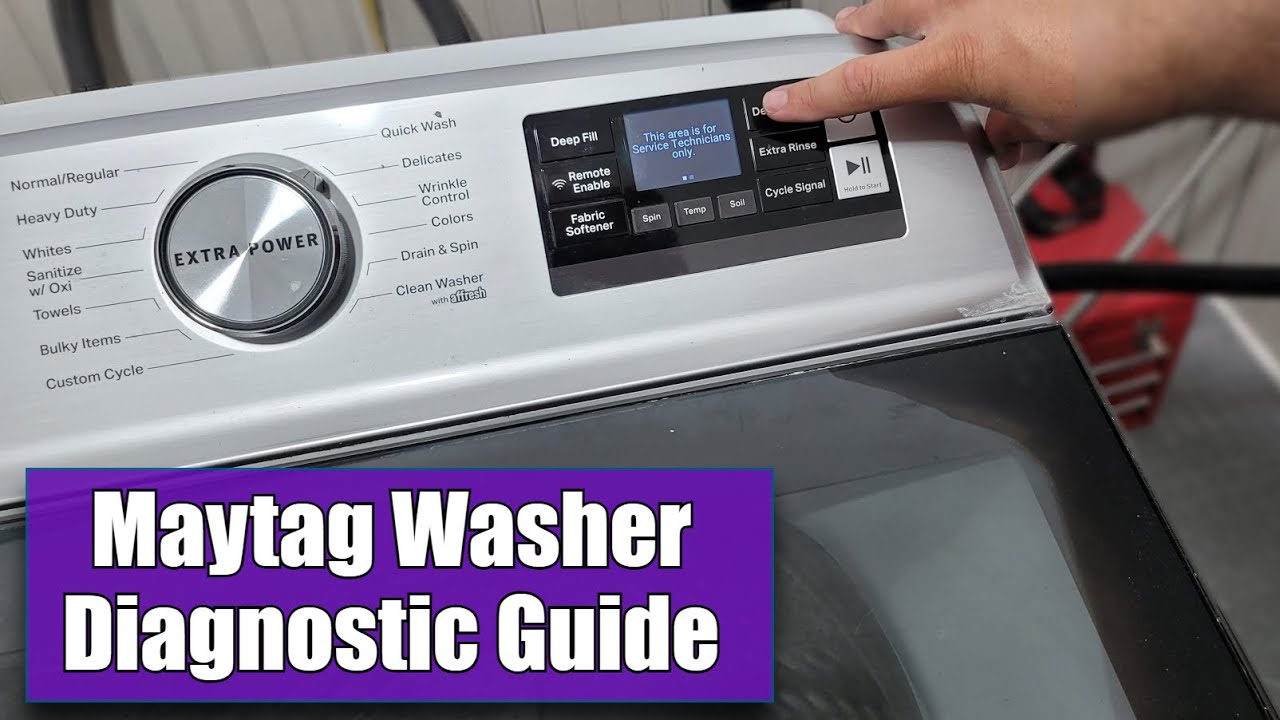
Diagnostic mode lets users run tests and see more detailed error info. This mode is useful for advanced troubleshooting. Accessing diagnostic mode varies by model but typically involves pressing a sequence of buttons on the control panel.
Once in diagnostic mode, you can reset the washer’s software or run motor and sensor tests. This can help identify if the motor, timer, or control board needs repair.
Here is a general way to enter diagnostic mode:
- Turn off the washer.
- Press and hold specific buttons (like Start and Power) simultaneously.
- Release buttons when the display shows diagnostic codes.
- Use controls to navigate tests and resets.
Exiting diagnostic mode usually requires powering off the machine. This mode is vital for clearing deep software glitches.
Resetting the motor or timer may also be done through diagnostic controls. This can fix issues like the washer not spinning or the timer not advancing.
Resetting Front Load and Top Load Maytag Washers
Resetting a Maytag front load washer often involves a power cycle or control panel reset. Sometimes, a washer door reset is needed if the door won’t lock. For top load washers, the reset guide is similar but may include lid lock resets.
If your Maytag washer won’t start, check the circuit breaker first. Resetting the breaker can restore power. Also, verify the washer door or lid is fully closed and locked.
Follow these tips based on washer type:
- ✅ Unplug for 5 minutes.
- ✅ Close the door firmly.
- ✅ Press and hold the Start/Pause button for 5 seconds.
- Turn off and unplug the washer.
- Close the lid firmly.
- Press and hold the Power button for 5 seconds.
These steps reset control panel software and lid lock sensors. If the washer won’t drain, reset the drain pump by unplugging and clearing blockages.
Maytag Washer Power Cycle and Circuit Breaker Reset
Power cycling is the easiest reset method. It clears electronic glitches by cutting power fully. If your Maytag washer stopped working after a power outage, resetting the circuit breaker can help.
Here is a checklist for power and circuit breaker reset:
- Turn off the washer.
- Unplug for 5 minutes.
- Plug back in and power on.
- Check the circuit breaker if no power.
- Reset breaker by switching off and on.
This process refreshes the washer’s control board and electronic systems. It often solves issues like frozen controls or locks.
Fixes for Maytag Washer Won’t Start or Drain
A common problem is the washer not starting or draining. After a reset, check these areas:
Resetting the lid lock sensor or power cycling often fixes start issues. For drain problems, clean the drain hose and filter. If the washer won’t drain after these steps, the drain pump may need replacement.
For safe maintenance and cleaning tips, knowing how to fix a noisy washing machine when spinning can also help prevent future problems. Learn more in our detailed resource on fixing noisy washing machines.
Conclusion: Expert Insights and Best Practices
Resetting your Maytag washer is a key step to fix many common problems. Power cycling, control panel resets, and diagnostic mode use help clear errors fast. Always start with a simple reset before calling a technician.
Remember to check the washer door lock, drain system, and circuit breaker if problems persist. Regular maintenance and proper use prevent many issues. For example, cleaning your washer regularly helps avoid mold and odors.
Industry consensus indicates that most Maytag washer faults can be resolved by following the reset procedures outlined here. If you face complex errors or mechanical failures, professional help is best.
With these tips, you can keep your Maytag washer running smoothly and extend its lifespan. Remember, a good reset is often the first step to a quick fix.
Frequently Asked Questions
How do I enter diagnostic mode on a Maytag washer?
To enter diagnostic mode on most Maytag washers, press a specific sequence of buttons on the control panel. This sequence varies by model but often involves pressing the Start and Power buttons together or holding down a cycle button for several seconds. Check your user manual for exact steps.
What should I do if my Maytag washer won’t start after a reset?
If your washer won’t start after a reset, first check the power supply and circuit breaker. Also, ensure the washer door or lid is properly closed and locked. If the problem persists, the issue may be with the control board or motor, requiring professional service.
Can I perform a factory reset on my Maytag washing machine?
Yes, some Maytag washers support a factory reset to erase all settings and error codes. This usually involves unplugging the machine for a few minutes then holding down certain buttons during power-up. Refer to your specific model’s manual for instructions.
What are common error codes on Maytag washers?
Common Maytag error codes include F01 for motor issues, F05 for water problems, and F21 for door lock errors. Each code signals a specific fault that often can be cleared with a reset or simple troubleshooting.
How do I fix a Maytag washer that won’t drain?
If your Maytag washer won’t drain, first reset it by powering off and on. Then check the drain hose for clogs or kinks. Clean the drain pump filter if accessible. Persistent issues may require replacing the drain pump or calling a technician.

Michael Peterson is a home appliance writer focused on practical washing machine care, maintenance, and troubleshooting. He shares simple, reliable tips to help readers keep their washing machines running efficiently, avoid common problems, and extend appliance life.