Introduction to Resetting GE Washers
GE washing machines are smart appliances with many features. Sometimes, you may need to reset your washer to fix errors or restart cycles. Understanding GE washer reset instructions helps solve common problems quickly. This guide shows easy ways to reset your GE washer safely and correctly.
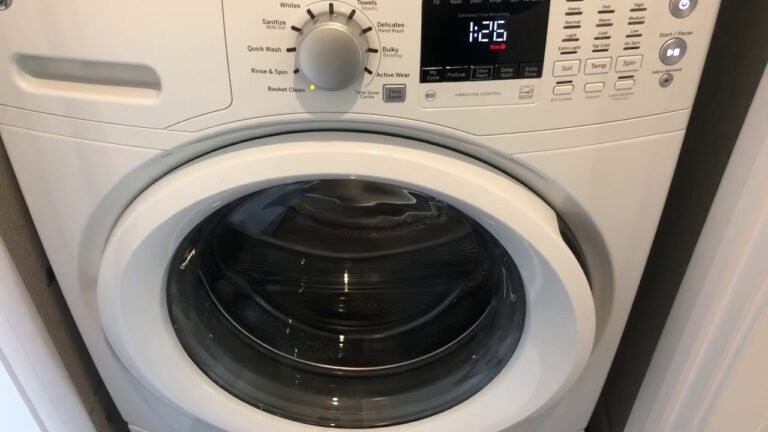
Before starting, make sure you read your GE washing machine user manual. It has specific info for your model number and can guide you on error codes and resets. For a deeper understanding of this mechanic, analyzing resources on GE washing machine control panel reset provides excellent foundational context.
Knowing how to restart your GE washing machine is a key step in troubleshooting. It can clear error messages and restore normal function.
Performing a Power Cycle Reset
One of the simplest ways to reset your GE washer is to power cycle it. This means turning it off and on again to clear the system.
Here is a basic GE washer power cycle guide:
1. Turn off the washing machine using the power button.
2. Unplug the machine from the electrical outlet.
3. Wait for at least one minute to let the control board reset.
4. Plug the washer back in.
5. Press the power button to turn it on and start a new cycle.
Resetting Washing Machine Cycle and Error Codes
Sometimes, your GE washer may show error messages or stop mid-cycle. You can reset the cycle or clear error codes by following these steps.
First, try the GE washer spin cycle reset if the spin is stuck. Cancel the current cycle and start a spin-only cycle to test the machine. If the problem persists, resetting the control board might be needed.
Resetting error codes GE washer often involves entering diagnostic mode or performing a factory reset. Check your user manual for the exact button sequence for your model.
Here is a simple table showing common error codes and what they mean:
| Error Code | Meaning | Reset Step |
|---|---|---|
| OE | Drain error | Check drain pump and reset power |
| UE | Unbalanced load | Redistribute clothes and restart spin |
| LE | Door lock error | Check door lock and power cycle |
| FE | Water overflow | Turn off water supply and reset |
If you want to learn how to fix a washing machine that won’t spin, this related guide offers more detailed help: how to fix a washing machine that won’t spin.
Using GE Washer Diagnostic Mode
The diagnostic mode on GE washers helps find hidden problems. It runs tests on parts like the water inlet valve, drain pump, and lid switch.
To enter GE washer diagnostic mode, you usually press a sequence of buttons on the control panel. This varies by model, so check your user manual.

Once in diagnostic mode, you can run tests and reset error codes. This is called a manual reset GE washer and often fixes errors that power cycling does not.
Diagnostic mode also helps test the GE washer door lock reset if the door will not lock or unlock properly.
Resetting the Control Board and Factory Defaults
If your washer has serious issues, resetting the control board to factory defaults might help. This wipes all settings and error codes.
To do a factory reset GE washer, follow the user manual instructions carefully. This often involves holding down certain buttons while powering on the machine.
Resetting the GE washing machine control board reset can fix persistent problems like timer errors or unresponsive controls.
Be sure to save any custom settings before this reset, as they will be lost.
Other Useful Reset Tips
Besides power cycles and diagnostic modes, here are other ways to reset your GE washer:
- ✅ GE washer timer reset: Unplug the machine and wait a minute to reset the timer circuit.
- ✅ GE washer power button reset: Press and hold the power button for 3-5 seconds to force a restart.
- ✅ GE washer’s circuit breaker reset: If your washer trips your home breaker, reset the breaker switch and then reset the washer.
These simple actions often clear glitches and restore normal function.
Remember, if your washer continues to malfunction, it might need professional repair. Common part issues include the water inlet valve and drain pump.
For more troubleshooting tips, you can check this helpful resource on how to reset a GE washer.
Conclusion
Resetting your GE washing machine can solve many common problems. Use simple steps like power cycling, diagnostic mode, and control board reset to clear errors and restart cycles. Always consult your user manual before attempting advanced resets.
Knowing these reset methods helps you save time and avoid costly repairs. Regular maintenance and proper use also keep your washer running smoothly.
If you want to keep your washer in top shape, learning how to clean and maintain the machine is key. For example, knowing how to clean agitators helps avoid buildup and errors. You can explore our guide on how to clean agitator on washing machine for useful tips.
With these tools, you can manage your GE washer confidently in 2026 and beyond. Happy washing!
Frequently Asked Questions
How do I reset a GE washing machine control panel?
To reset the control panel, unplug the washer for one minute, then plug it back in and press the power button to restart.
What is the GE washer diagnostic mode?
Diagnostic mode allows you to test and find errors in your washer. You usually enter it by pressing certain buttons on the control panel in a sequence.
How can I clear error codes on my GE washer?
Most error codes can be cleared by resetting the washer through power cycling or entering diagnostic mode and following reset instructions.
Does my GE washer have a reset button?
Most GE washers do not have a dedicated reset button, but you can reset them by power cycling or using control panel buttons.
What should I do if my GE washer door lock won’t reset?
Check if the door is fully closed and locked. If the door lock error persists, try power cycling the washer or consult the user manual for advanced troubleshooting.

Keith Boyd Is A Seasoned Appliance Care Expert With Over A Decade Of Experience In Home Appliance Maintenance. His Authoritative Insights On Washing Machine Care And Upkeep Are Trusted By Homeowners Nationwide. With A Passion For Educating Others, Keith Shares Valuable Tips That Ensure Your Appliances Run Smoothly For Years To Come.